This post was inspired by a discord message from a friend. I thought it could be fun to mark the end of this year with my current “life stack,” since I so frequently change so much about the technologies and methods I use in life.
Computing
Hardware
I work off two machines. My laptop is a Framework 13 AMD, and my desktop is an AMD system with an Nvidia GPU. I run a homelab from spare parts and 4 18TB drives, as well as a NAS with 4 14TB drives. I like the Framework, and recently upgraded the mainboard and display in it. My desktop has 20TB of storage across a couple drives, because I like to have my entire Steam library installed.
I disregard the cancelling of Framework because I agree with the criticisms of DHH but disagree with the scorched Earth policy of reverting to more destructive behavior when I become disappointed with someone in progressive spaces. If any of us can justify hosting on AWS, whose owner makes its employees piss in bottles, then we can justify buying Framework, who makes repairable laptops and unfortunately sent one to someone distasetful.
I use a ZSA Voyager keyboard. Here’s my layout. I have the keyboard mounted on a standing desk almost totally vertical. ZSA interviewed me, btw.
I use Android phones because I find Apple’s walled-garden and anti-user-freedom behavior to be disgusting. I like being able to run whatever software I want on my phone, and I love the repos I can add to F-Droid. Right now I’m using a Unihertz Jelly Max because I’m tired of giant phones. My ideal phone would be a 4.8" oled screen thicc Android with a fatass battery and a headphone jack. The Unihertz gets me as close to that reality as I think is possible.
Operating System
All my machines run some flavor of linux. My laptop and desktop both run Manjaro, and my homelab runs Ubuntu 24.04. The NAS runes TrueNAS.
I use hyprland on my desktop and laptop.
My desktop is also a gaming rig, and I usually launch games from Steam so that I can leverage Proton. I’ve used Lutris as well, when some friends wanted to play WoW. I love being able to just keep the desktop in one OS and not need to restart it on the weekend to game. It’s a bit of a bummer that I can’t play some games with invasive DRM, but, none of my friends really play modern games anymore, and I only get a few hours a week to do so myself, so it’s fine.
IDE
I now primarily use nvim. In order to get productive as quickly as possible, I use a pre-built setup called lazy.vim. I like this because I find it easier to ovverride the default configs in lazy.vim than other pre-built configs I tried. Also this guy wrote a great usage guide for it.
I used to use, and love, Emacs. I still love the idea of Emacs, and I’ll still have conversations that make me want to spend more time learning it and using it, but I found that spending so much time learning and configuring Emacs was holding me back from learning the operating system itself. Instead of picking up a keyboard-forward window manager like i3wm (eventually sway) (eventually hyprland lol), I was doing everything in Emacs frames. Instead of learning how to use commandline tools, I was always picking up Emacs packages to accomplish things. Furthermore, as powerful as org-mode is, I found the actual usage of it to be counterproductive. I’ll discuss this more in the “organization” section, below.
I always used evil-mode in Emacs, and I got tired of support in other packages not being great, and always feeling like a second-class citizen because I didn’t use default Emacs bindings. Which, fair, but modal editing feels far superior to me than default Emacs bindings, and so I feel much more comfortable in nvim world, where all packages are pre-configured to expect vim bindings.
I also find nvim LSP support to be more feature-rich and stable. However, emacs seems to be getting more interesting AI tooling support, so, perhaps I’ll try it again in the future!
AI Tooling
I’ve tried many AI IDEs and terminal agents, such as Zed, Claude Code, Warp, Supermaven, Windsurf / Codeium, Cursor, and and Copilot. If there was a plugin for one of these tools in either nvim or emacs, I’ve tried both, as well as native tooling such as with Cursor.
My first usage of Cursor felt like a hit of a good drug, and like that first hit I’m still chasing the dragon. I realized that Cursor perhaps wasn’t the perfect productivity-add I thought it was when I found myself stumbling to explain code I kinda-sorta-wrote during a pair programming session, while discovering that that code kinda sucked. Still, I want to reproduce that sense of incredible productivity I felt when I first started using Cursor in blissful ignorance.
Unfortunately no tooling comes anywhere near the tab-completion experience of Cursor. I have found Claude code’s agent mode to be fine, and just use git diffs to check the changes, so I don’t really need that built-in experience in Cursor’s agent mode. For AI completions in nvim, I’ve settled on Copilot, since it’s “good enough” and didn’t seem meaningfully different from Supermaven or Codeium, and our company gets it for free. Lazyvim has some interesting context-aware Copilot chat plugin, but I don’t really know how to use it, so I mostly just use Claude code when I want an agent.
Other Software
Outside of organization software I cover below, I want to mention some software that makes my life a little better.
On my homelab, I run quite a few services.
Jellyfin is incredible software that basically lets me host a private Netflix, serving all content I legally ripped on my massive 50TB zfs array for my viewing pleasure wherever I happen to be in the world.
calibre-web allows me to host all my ebooks for easy downloading to the various ereaders I use, and even has an OPDS server available for clients such as koreader to ingest.
Linkace is my web bookmark manager, I like having a remote service like this because it works no matter the device I’m on, and feels more organized than browser bookmarks. I’d tried some other tools, especially CLI based ones, but they didn’t feel as useful. Also, I really like that I can make publicly shareable lists.
FreshRSS is an RSS aggregator that I access either the webclient for, or use its RSS publication feature to aggregate my favorite feeds into a single feed I can ingest into whatever client on my phone. Also, Calibre looks at the RSS output of this app once a week and generates a “Weekly News” epub file, which I can then download through OPDS to my Kobo and read the news in a more static way.
Audiobookshelf provides a web client as well as rich mobile apps for listening to my legally downloaded audiobooks. This is a key part of how I fixed my sleep schedule, I just chuck on a little audiobook on a 15 minute sleep timer and zonk out.
Tubearchivist is a Youtube download and archive tool. I used to use this to help break my youtube addiction since the only videos I downloaded were from channels I was interested in, saving me from algo slop designed to maintain my constant engagement. Also, no ads! I switched to Grayjay since that significantly reduces my harddrive space needs but I still use Tubearchivist to back up channels I want to archive, such as g0v in Taiwan or Channel5News. I still have a couple Channel5 videos that were removed from Youtube because of Tubearchivist.
Various services use Gotify to send notifications to my phone.
Navidrome lets me stream my collection of lossless music to whatever device I want.
Komga lets me read my comic collection in a web browser.
Romm lets me serve an excellent web client for viewing and downloading my legally ripped ROMs, and certain consoles can even be played in the browser.
Organization
My organization and personal data management has changed significantly, as has my whole philosophy, now that I’m off org-mode. I think org-mode is an excellent and powerful tool, but I think I suffered from the classic ADHD issue of procrastination-through-optimization. org-mode was more a fun distraction than an effective organization and knowledge management tool for me. Also, I really needed a more effective and portable journaling and review system. I’ll get into detail below.
Journal
The root of my organization system is now Trilium (technically trilium-next). This is a database based text editing software similar to Notion, Logseq, or Obsidian. I tried all those tools as well and settled on Trilium because it’s able to be self-hosted, was easy to deploy, has a good web experience, and of the tools had the best “daily, weekly, monthly, yearly” journal experience.
Trilium has a button I can click that will instantly take me to “Today’s note,”
which it will create, alongside the week and month note for that period if it
doesn’t exist yet. Notes are also folders, so I can have my daily journal and
todo list in my daily note, but also nest things under it like meeting notes.
This would be the equivalent of the org-roam-daily-today function. There’s a
feature unique to the “Journal” notes where Year, Month, Week, and Day notes can
automatically be created from a template. I set the ~dateTemplate= property of
my Journal note (the root of all year, month, week, day notes) to point to my
“Day Template” note, which looks like this:
## Review

1. All habits done that can be?
2. Tomorrow planned?
3. Work done towards goals:
  A. Mandarin:
  B. Weight Loss:
  C. Improving Engineering:
4. Satisfaction level?
5. What gave me energy?
6. What drained my energy?
7. What gave me joy?
8. What made me feel bored?
9. When did I feel most myself today?
10. I felt most absorbed when…
11. I felt slightly playful when…
12. This made my brain light up:
13. Wins today:

## Plan

1. Habits allocated time?

## Journal

## Todos
I had a major depressive episode like 4 months ago and as a result read a bunch of books about ADHD, as well as talking with a therapist and Mr. ChatGPTherapy. I just dumped my journals into ChatGPT and asked for advice. These questions are the result. The point is, every day I check in on what I actually like doing and what gives or takes away energy from me. I’m also hunting down what activities naturally engage my ADHD hyperfocus and are worth pursuing for deeper learning. For example, this caused me to discover I really enjoy drumming. If this is surprising to you that someone doesn’t know what they like doing or might like to do, you’re lucky! I’m not. The key passage from “Delivered from Distraction” by Edward M. Hallowell is:
The connected individual-of any age- naturally feels safe and secure enough to go to step 2 in the cycle, which is play. By play, I mean something deeply and profoundly formative - any activity in which you become imaginatively involved. The opposite of play is doing exactly what you are told.
When you play, your brain lights up. This is where you could find joy for the rest of your life, so take note when it happens… When you play, you are likely to enter a state… named “flow.” In “flow,” you become one with what you are doing… Your brain glows.
The more activities you try, the more likely you are to find one where your imagination kicks in and you play… Once you find some activity in which you can play, you want to do it over and over again. This is called practice, which is step 3. Practice that emerged out of play is practice you want to do. You don’t have to be hounded to do it; you want to do it. Here is where habits of discipline develop that will last you a lifetime.
As you practice, you naturally achieve mastery, which is step 4. By mastery I do not mean that you are the best, just that you are getting better. This feeling of making progress is the key to self-esteem and confidence, as well as motivation. …
As you gain mastery, other people notice and value what you’re doing. This is step 5, recognition.
So, that’s become the main goal of my daily journaling to track. I still keep an
“engineer’s log” in the “Journal” section of the note just because it feels
kinda cool and has sometimes been useful, such as when I recently searched
useradd to find the onboarding flow for new users to our co-op’s VPS.
Furthermore, I keep a daily written journal in a Hobonichi Techo Cousin. Next year I’ll use the smaller sized original version. In here I’ll focus more on emotions and vibes, and leverage the magic of handwriting as a sort of meditative exercise. I can’t really read my own handwriting so this has very little review potential. It still feels good to slowly be creating a real-life artifact of my year. Although of course I have the archivist obsession with digitization, and value the ability to search digital notes, more and more I’m moving back to analog in specific areas. I also fill out in green pen what I got up to across the day in the Weekly Agenda portion of the Hobonichi. I’ll discuss more in the Calendar section.
On Sunday or Monday, I do a weekly review. It looks like this:
## Plan

1. Tammy time on calendar?
2. Friend time on calendar?
3. 1 known energy gain on calendar?
4. Any major events need further planning?

## Big TODOs

## Review

1.  Satisfaction level?
2.  Goal progress? A. Mandarin: B. Weight Loss: C. Improving Engineering:
3.  What gave me energy?
4.  What drained my energy?
5.  What brought genuine joy?
6.  What made me feel bored?
7.  When did I feel most myself?
8.  When did I experience “Flow?” When did I feel absorbed?
9.  What activities consistently felt like “play?”
10. What activities did I naturally seek out?
11. What made my brain light up?
At the end of the month, I do a monthly review. It looks like this:
## Month Overview

1. Does your month have friend hangouts?
2. Family hangouts?
3. Tammy dates?
4. A motorcycle ride?
5. Any major events need further planning?

## Big TODOs

## Review

What stood out?

1. Progress on goals: A. Mandarin: B. Weight Loss: C. Improving engineering:
2. What gave me energy?
3. What drained my energy?
4. What brought genuine joy?
5. What made me feel bored?
6. When did I feel most myself?
7. When did I experience flow? When did I feel absorbed?
8. What activities felt like play?
9. What activities did I naturally seek out?
10. What made my brain light up?
11. What habits felt enjoyable or supportive? What activities improved my mood
    or confidence?
12. Which habits am I doing out of obligation?
13. Major accomplishments and minor victories?
14. Focuses for next month?
Task Management
I used to use org-mode to manage my tasks, and had it all set up with GTD tags and contexts, custom super-agenda views I could invoke with muscle-memory keystrokes, had custom org-capture templates, the whole shebang. It worked fine. I thought I didn’t like how it wasn’t very portable, even though apps like Orgzly exist, but then I tried an experiment with CALDAV vTODO entries on a self hosted calendar and using Tasker with Davx5 syncing to have a really great task experience between my phone and desktop. Then it turned out that portability wasn’t the missing link, it was the fact that my TODO list was infinitely long, and despite having prioritization, didn’t have a good way of setting temporal priority.
I experimented with SCHEDULED and DEADLINE properties in org mode and in the agenda view, but what getting a Hobonichi physical planner made me realize is that what I really wanted was a way to see my tasks and needs laid out upon a calendar. org-mode just doesn’t really have a good way to do this, at best you can get agendas, which must be invoked any time you want to see them, and they can only be for a day.
I wanted a way to say, “I have 7 big things I want or need to get done this
month, I want to schedule them such that they 2 will get done in the first week,
3 the second, etc. And I want to be able to see day to day which days are busier
or not and easily slot tasks in during planning phase.” I also wanted a way to
plan far ahead, put something like “you need to have the plane tickets for Japan
Burn purchased by this month.” Having #[A] next to tasks plus context plus
deadlines wasn’t getting me there.
So, I sacrificed the ability to generate on-the-fly agendas and quickly move around TODOs for a digital experience very similar to my physical diary, where tasks have to be manually moved around with copy - paste operations and basically manually laid out.
Year, Month, Week, Day TODOs
In practice, here’s what that looks like. Trilium has my “dailies” laid out like this:
- 2025
---- January
--------Week 1
------------ 2025-01-01
------------ 2025-01-02
---- February
In the 2025 note I’ll put all my big ambitions for the year:
## Big ambitions

- Learn Rust
- Add review feature to OSMAnd
- Improve drumming
As well as have a spot for “floating” todos, that are granular tasks that I can just go ahead and do, but I don’t really care when they got done, or, they got moved here from a month/week/day (more on that below).
## Floaters

- Get Taiwanese IDP
- Get guitar amp
When a month starts, or is about to start, I take a look at my ambitions and floaters, consider the remainder of my year, my calendar (any trips that month? Any big work projects?), and any TODOs that are time-constrained to that month (e.g. trip planning), and then try to fit in floaters or smaller slices of a big ambition into the TODOs for that month.
Here’s what a month looks like:
## TODOs

- edit photos for 2025.8.12
- glue sandals
- get appointment with nutritionist
- get some work done on rust project
Once a month is “planned,” I take a look at the TODOs for the month, and start breaking them out across the weeks. This would be, in my hobonichi, the part that looks like this:
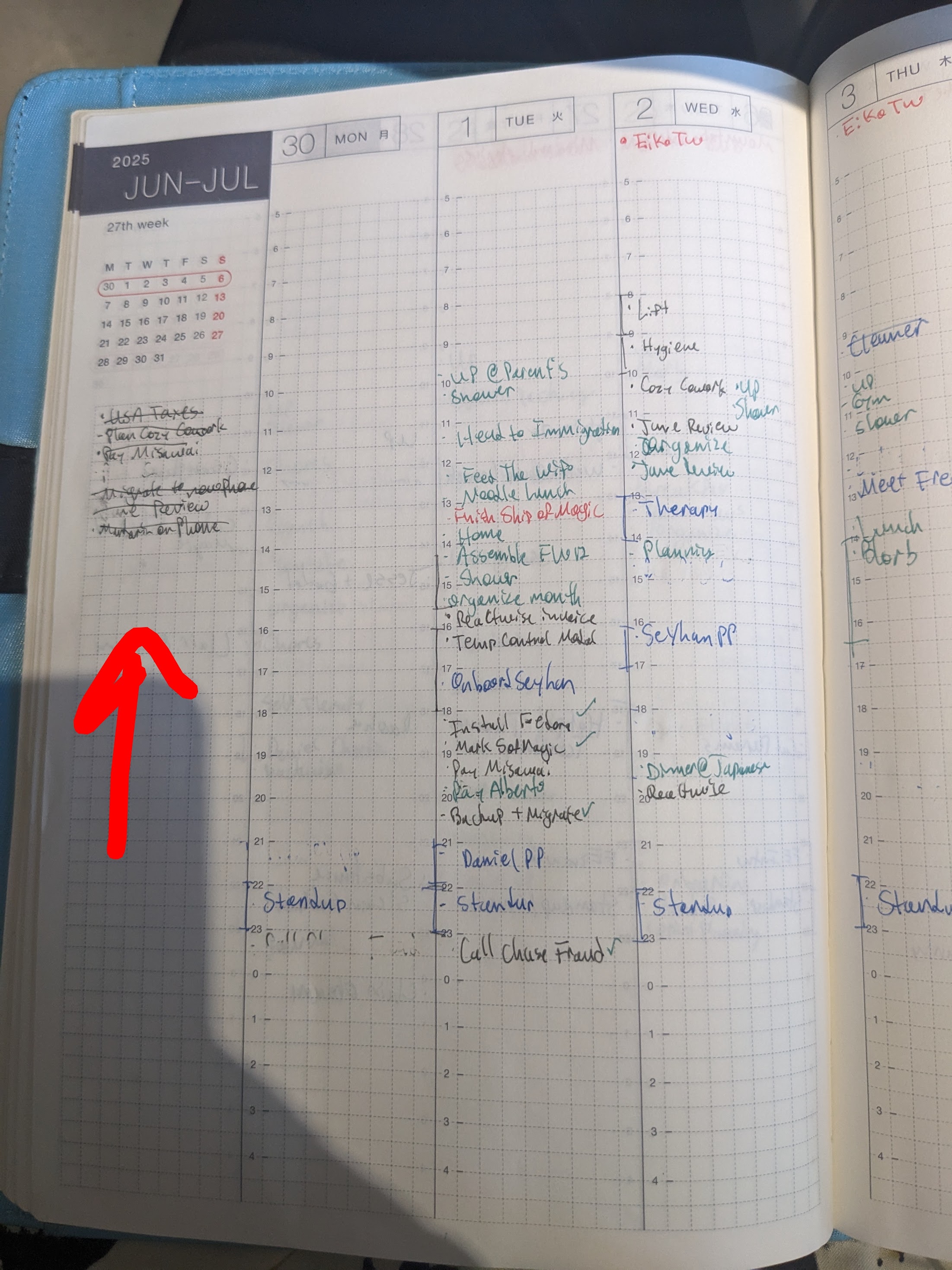
So, I would create Monday day notes for each week of the month, which automatically creates week notes. Then, in the week TODO, I’ll assign a couple monthly tasks/ambitions, again taking into consideration my calendar and anything that’s already on that week’s TODO (again e.g. if there’s trip planning or something that needs to happen then).
Here’s a week’s todo:
## TODO

- Edit photos for 2025.8.12
- glue sandals
Notice that those TODOs are cut and paste straight from the month TODO. I remove it from the month list when I assign it to a week, to keep things uncluttered and so that when I look at the month list, I know it’s things that haven’t been assigned yet, which either means they need to be assigned, or, are just floaters waiting for me to have free time to do them whenever (preferably that month).
The pattern continues. On Sunday or Monday, I break my week tasks out across days. Again, I’ve got my calendar open when I do this. I might have a nice big empty coworking day where I want to put tasks that’ll take a lot of time, and put smaller tasks on days I have a couple appointments. Or, something will need to have feedback from someone else before I can do the next step, so I schedule that for a Monday or Tuesday.
Here’s a daily todo:
## TODO

- glue sandals
- rw-1330 fix experiment button
- confirm date time with tammy
Again, when I move something from week to day, I cut and paste it.
The critical step that makes this all work is my “waterfall” that I do at the end of a day, week, month, and year.
TODO Waterfall
At the end of every day (or start of the next day), I review that day. I do the same every week, month, and year. This review is half a self-learning activity (see journaling above), and half task management, or perhaps “project management”.
So, at the end of the day, consider the above daily TODOs. I’ve finished
confirming my date time with Tammy, but I didn’t glue my sandals, and I didn’t
finish working on the rw-1330 ticket for my job. I did work on the ticket, but
I don’t care to track that in my TODO system (I used to use org’s clocking
feature to track this kind of thing, but then realized that outside of client
projects, this was useless information).
Depending on the priority of the task, and the layout of the remainder of my week, I’ll simply cut and paste those remaining tasks to the next day, or some other day of the week, or, if it doesn’t matter if the task gets done that week, or if I can’t do the task this week because I’m blocked, I’ll just bump it up back to the week TODO list. Then, I’ll check the week TODO list to see if there’s anything of priority there that needs to be moved into the next day or some other day, and if there’s too much in that week, I’ll cut out some of the week tasks and move them into the month list.
I’ll do the same at the end / start of every week and month, and thus my task lists are constantly kept mostly up to date with priority established in a temporal sense. At least once a week I’m going to have taken a peek at any floaters hanging around in the month or year tasks, and the super time-sensitive stuff will already be scheduled in some future week or month, so I just don’t need to worry about them.
You might think that’s time consuming. My daily review usually takes about 10 minutes at most, including task review. Week review and planning usually takes about half an hour, and monthly usually takes about an hour. The year process is much more time consuming: including the Year Compass, this usually takes many hours spread out over a couple days. However, I consider it critically important in terms of ensuring I actually do shit during a year, and continue self-improvement.
What’s important to me is that so far, this is the most organized and effective I’ve ever been, or felt, and I’ve had external feedback from work, my partner, my co-op members, and my friends verifying this.
New TODOs
If something pops up randomly in a day that I need to note as a TODO, it’s critically important that I can record it instantly with no friction. I have two ways of doing that: if I just have my phone on me, I create a VTODO entry using the jtx Tasks app on android, which saves to a self-hosted caldav server. Then, as part of my daily review, I view my VTODO list in Thunderbird and move these TODOs to a given day, week, month, or year list.
The other way I record these is my current experiment, detailed below.
Small Notebook Daily TODO List
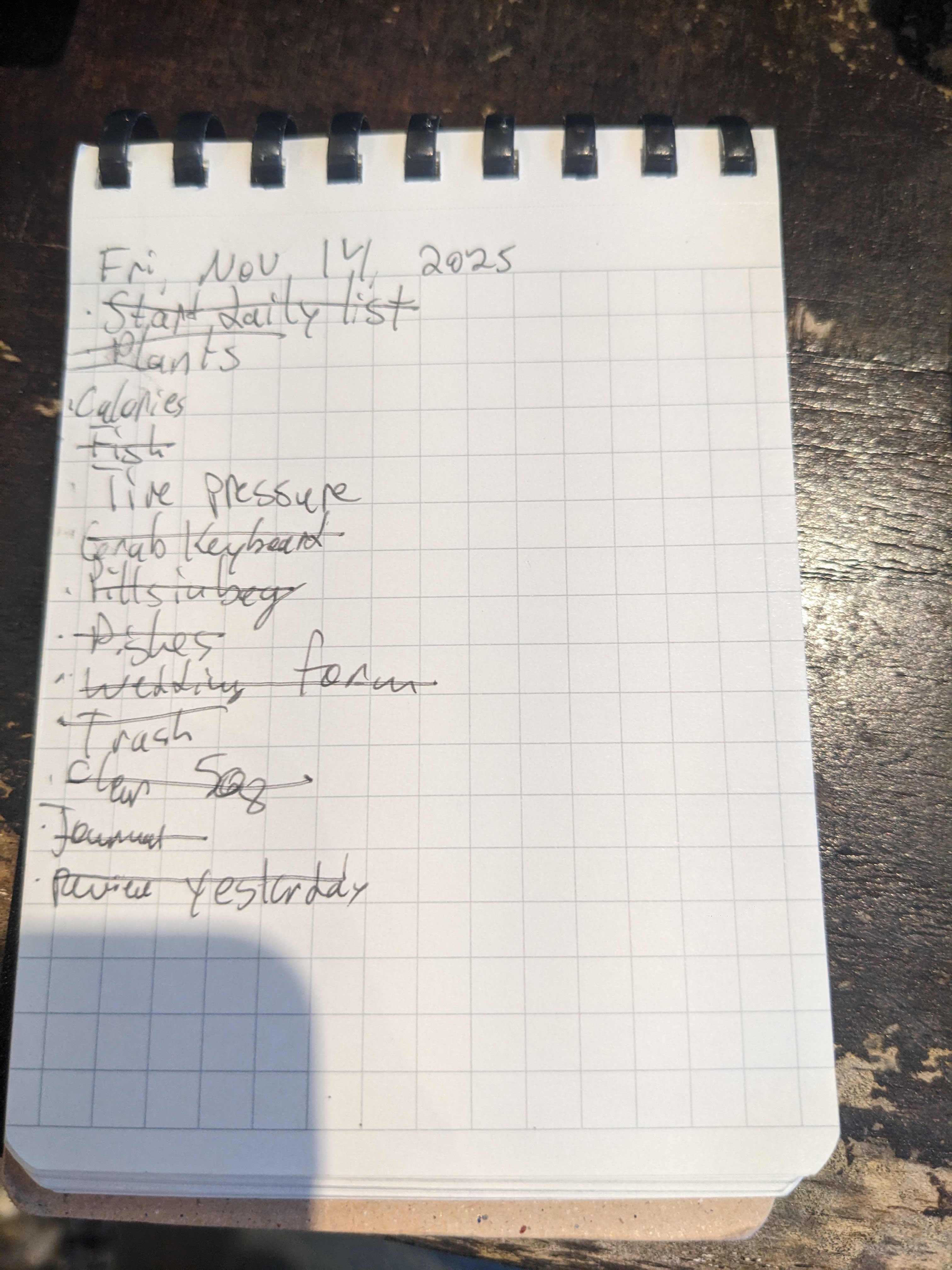
Based on a random Hackernews comment that I can’t find anymore, I’m trying out carrying around a small spiral notepad. Every morning I start on a fresh page, write the day and date on the top, write “Start daily list,” cross out “Start daily list,” and then write anything that immediately comes to mind that I need to get done. This helps me clear my head out in the morning right away. If I have something on my Trilium list that’s not on my pad, or vice versa, I copy from one to the other.
This helps me better internalize what I need to get done that day, helps center me in the date (I often will, during this process, think something like “wow it’s already the 20th, I should make sure to lock in on xyz task,” or “summer’s almost over, I need to go to the beach this weekend!”), and is kinda fun for whatever reason.
Also, it’s nice to always have a notepad on me, because then I can stamp it in the metro, which is a fun little colorful way to see what days I was out and about. Also, I’m back to thinking hand-written notes is superior to all other methods, so I can take down notes at the doctor’s office or whatever on my notepad. I switch to the back side of the notepad rather than use the TODO page for notes. Then I copy notes that need to be remembered, into Trilium.
At the end of the day, I check the page to see if there’s anything critical left on it, get that info into Trilium if necessary, and then rip that page out and put it in a glass jar I have on my desk. This is fun too.
I find this process much more feasible and fast than the thermal printer thing that everyone is kinda obsessed with right now.
Notes
I used to take notes in org-mode and use org-roam to link them all, following Zettelkestan. After 7 years of this, I didn’t find these linked notes to be any more useful than just a full-project string search, and furthermore, it was time consuming, and finally, the graph-view thing was only ever useful to show off at a coworking meetup.
I also determined that I was taking way too verbose notes. I would hand-write my notes and then copy them verbatim to my system. I wanted to digitize EVERYTHING!
So, over the years I tried many experiments in trying to find ways to markup what I’m reading - annotating PDFs in emacs or similar, or, using an e-reader that has a tablet note-taking function (Boox, Remarkable), or using tablets with pens such as the Surface Pro or Ipad. 8 years of experimentation has led me to determine that pen and paper remains the most effective, dependable, and rapidly-deployable note taking method. I can make it more fun by using fountain pens, but day to day I use Pilot FriXion erasable 4-color pens, which I love because they come in 5mm variations which let me have very neat and tidy notes, and having multiple colors is great for letting me have rich markup in my notes. All the electronic methods suffered from dependability issues and were too slow to deploy. With a small notebook (I prefer the soft-spiral Kokuyo notebooks) I can whip it out and be taking notes within seconds, no fiddling needed.
For notes in pdfs and epubs, I use a Kobo Clara BW. I discovered that more important than any rich notetaking functionality was the ability to have my e-reader on me at all times, and the Kobo Clara BW is small enough to fit in my back pocket. I just use the highlight functionality, and then copy my notes to Trilium when I finish reading.
In Trilium, I have Reading note, where I nest all the books and articles I
read in their own note. I have some “promoted” attributes that I use for basic
data like URL, author, and start/end dates, but I haven’t done much with those
yet. Under a given note, I nest a Highlights note where I copy in any direct
quotes from the book I want to retain.
The most important change from my org-roam days is that I try to type out far fewer notes about an article or book. I narrow down the highlights to only the most important ones, and I note down only the really stand-out thoughts about a book. I don’t note down any kind of summary, or bullet-pointed article breakdown. I just note down a couple things that were useful or interesting to me, and move on. This way, each of my article and book notes are actually useful to me, rather than just the equivalent of a Wikipedia article on the thing. When I was deep in Zettelkestan world, I kept coming back to the thought that I was basically re-writing Wikipedia, and I didn’t understand the point of that when I could just go read Wikipedia instead. Cynical maybe, and I’m sure there’s Zettelkestan fans out there yelling right now about how my notes always should have been very brief little notecards, but just like with my TODO strategy, I needed to have more friction to make that happen.
Calendar
The calendar is a critical part of my life stack. I trust nothing to memory. If it needs to be remembered, it goes on the calendar. Basically all time-based things go in there: meetups, dates, meetings, deadlines. I often will lay out a rough sketch of a day in there as well, e.g., when I need to head out to make it to an appointment on time, when I hope to go to a cafe to work, or when I believe I should start working on some task vs another one to try to time-box activities.
Lack of a calendar-based view was a big reason I needed to get out of pure org-mode world. Yes there is the agenda, but it didn’t have the week and month displays I find very useful:
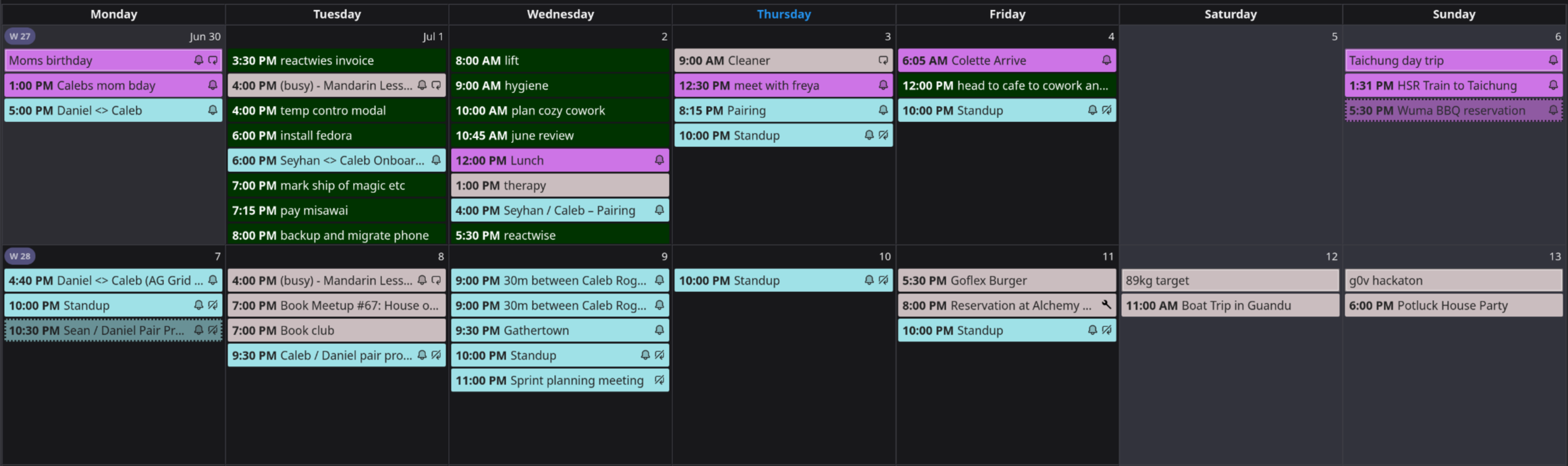
I like being able to click an item and quickly change its time, or drag and drop start/end times. In Emacs I could never get date pickers to work well in evil mode, and so always typing out dates in the exact required format got tedious. So I finally just moved back to a normal calendar.
I use Thunderbird on desktop to view my calendar, and Business Calendar on Android, since it’s the only client I could find that could handle arbitrary IMAP server profiles while also having good multi-timezone handling (Simple Calendar wouldn’t display correct time for repeating events in a specifically stated time zone while that time zone was in daylight saving’s time).
I use Google Calendar for things that I need to share with my partner or personal assistant, as well as for work. My personal calendar is hosted via Bluehost, and I’ve been experimenting with Davical for playing with VJOURNAL and VTODO. Davical is the most feature-rich Caldav server I’ve found. We use Nextcloud’s calendar for the co-op since it allows handing out a ics url that points to a “live” endpoint that clients can pull to have a hot-updating shared calendar for co-op events.
I use cal.com for booking meetings, which I haven’t bothered to self host yet since their free tier is generous enough to not need to bother.
I used to use Emacs + mu4e for email. One too many emails got formatted weirdly in mu4e, or accidentally sent because I mis-typed, or accidentally deleted, or I didn’t see it for whatever reason, so I moved to Thunderbird (nightly).
Most of my email accounts are through Google, however my personal mail is hosted by Bluehost, and my co-op mail is hosted by Migadu, which we use since it charges by usage, not by number of accounts, which is good since we have hundreds of members in the co-op but very little day to day usage.
I follow a inbox-zero flow and do basically no organization outside of “Inbox” and “Archive” (and spam). Lately I’ve been trying to delete as many emails as I can, such as related to login flows, marketing, calendar event reminders, etc, because they were cluttering up my search (my oldest email account is 20 years old). Other than that, I try to assign emails to tasks and then archive them, zeroing out my inbox any time I look at it. This concept was once captured beautifully in the “Inbox” app by Google, which Google killed because capitalism is the best form of economic organization to promote innovation. If you don’t know about inbox-zero, you should read a blog about it and then do it, especially if you have ADHD like me.
Reading
I read books on a Kobo Clara BW. I chose that because it’s small enough to fit in my pocket, so I can have it on me all the time, and because I can install Koreader on it, a sort of custom firmware that allows much more customization options, and for downloading books from my OPDS server.
I run a calibre-web server on my homelab that points to a gobsmackingly large archive of epubs. It also points to a list of RSS feeds generated by FreshRSS, which Calibre turns into weekly “Newspapers” that I can download as epubs to my Kobo. Here’s my feed list.
I still vaguely use Goodreads since I’ve been using it for like 16 years and figured might as well, but I also track reading start/end times, and what books I want to read next, in Trilium.
I find out good books to read next mostly through Cory Doctorow or recommendations from friends.
Life
Things related to the living of life.
Location
I live in Taiwan because I believe it’s the best place on Earth to live for most people. It’s safe, affordable, has robust infrastructure, a good and socialized healthcare system, decent public transit, and is highly politically engaged. When I first came to Taiwan, the Sunflower Protests happened, an extraordinary form of direct engagement by the population, and last year this happened again with the Bluebird Protests. Taiwan is one of the few countries on Earth for which I maintain political optimism through this next cycle of global fascism.
I’ve written a lot about Taiwan.
Transportation and Travel
I prefer always to take public transit, for environmental reasons but also because I find the experience of riding in private cars to be frustrating. Sitting in traffic, waiting in line for a parking garage, wandering a parking lot or neighborhood looking for parking, these are not my definition of freedom or a good time. I believe that designing cities around the car is one of the major contributors to human psychological suffering in the first world. Not to mention the environmental impact.
I also enjoy taking a bicycle.
I prefer trains to flying, even if it’s slower or more expensive. A train I can show up to 10 minutes before departure, and during the ride I can simply work on my laptop using my phone as a hotspot. A plane meanwhile is many, many hours of completely lost time. You must show up hours before, and lose a lot of time traveling to/from the airport since they’re usually quite far from your home and your end destination. You can’t work on them because the internet is unreliable and the seats are too narrow to get a laptop open sometime. Planes are uncomfortable and too small, and the entire experience is dehumanizing. I’m disgusted by the flagrant classism of making everyone sit and watch the first class customers get off first before the flight attendants will let the “cattle class” pass through.
Meanwhile a train is just like sitting in a cafe. Even if it takes all day, that’s what I was going to do anyway.
I typically travel with just one bag. I’ve written about this.
Social Media
I don’t use social media.
Fitness
I do cardio 3 days a week, either running or bicycling. 2 days a week I lift. I follow the GZCLP program. If I’m traveling, I take sandals with me to run, since I’ve been “barefoot” running since I was 14. I try to find a gym I can lift weights at, or, I just bang out some pushups and squats in the hotel room.
I stretch every morning, and I consider it a “load bearing” habit. I feel really terrible the entire day if I don’t stretch. It’s a very fast 5 minute routine: look up, down, left, right, roll head, hold my arms above my head and then pull them down like I’m doing a pullup, roll my shoulders, then touch my toes, then sit and touch my toes again, then pull one leg up over the other and more toe touches, then extend my legs and open them and do more toe touches. Then I put one knee down and the other leg behind me and stretch my hips, and do the same for the other leg. I usually just go right from that position to kneeling to do my meditation.
Nutrition
On the advice of many ADHD resources, I take fish oil every day, and I believe this led to a major improvement in my mood, wakefulness, capability in intellectual tasks, and depression symptoms. I also take b12 and I believe this also helped with the lethargy I was having before.
I try not to eat too many carbs.
Philosophy
I’m an anarchist. I have a utopian ideology. If my ideology can’t be achieved, I can’t conceive of a better world than an anarchist one, and so I maintain grim optimism and any political energy I have I put towards this ideology.
I try to treat everyone I meet with good faith and respect. I believe it’s important for people to be ready to actualize their values at any moment - for example recently I encountered a swastika on a wall, so went to the nearest store, bought tape, and covered it up.
I’ve written before about activism versus just living life and the dichotomy there remains an unresolved part of my personal ideology.